Google and bing ads - Responsive Search Ads
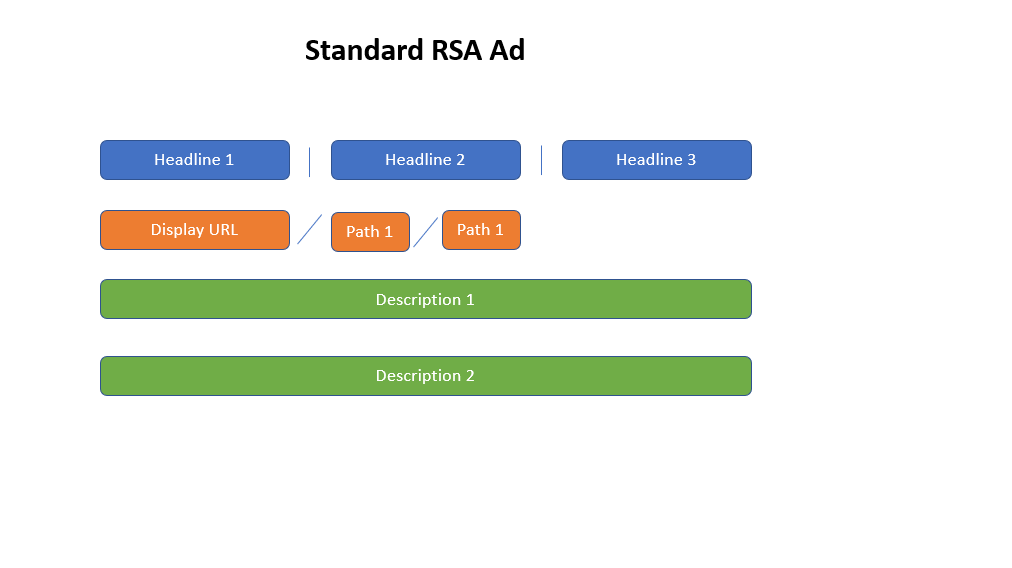
Headlines (1-15) *3 minimum - 30 characters max
People are most likely to notice your headline text, so consider including core keywords and themes into headlines. Headlines should be written as individual statements vs. one long sentence due to vertical bar separation. Your brand name, and high priority keywords should be incorporated into headlines to help boost quality scores. Ad customizers can also be utilized, which includes location customizers (based off user location), countdowns (for offers), and dynamic keyword insertion (bolds keyword we are bidding against within headline).
Display URL (Paths 1-2, 15 characters each)
The display URL is made up of the domain from your final URL and the text in the optional ”Path” fields. These fields are designed to help people who see your ad get a better sense of where they’ll be taken when they click it. Your path text doesn’t have to match the exact final URL. The domain of the display URL is automatically pulled from the domain of the final URL, and is not part of the character count of the Paths
*The display URL is for vanity purposes only, so when clicked, the ad will direct to the final URL
Descriptions (1-4) *2 minimum - 90 characters max
Use the description to highlight details about your product or service. Best practices include utilization of proper sentence structure when writing ad copy, and recommend writing out descriptions as one long sentence vs. separate points. If needed, can write out the description as one sentence, and have the CTA at the end as a separate statement.
Recommend 4-5 headlines, and 2-4 descriptions to maximize learnings.
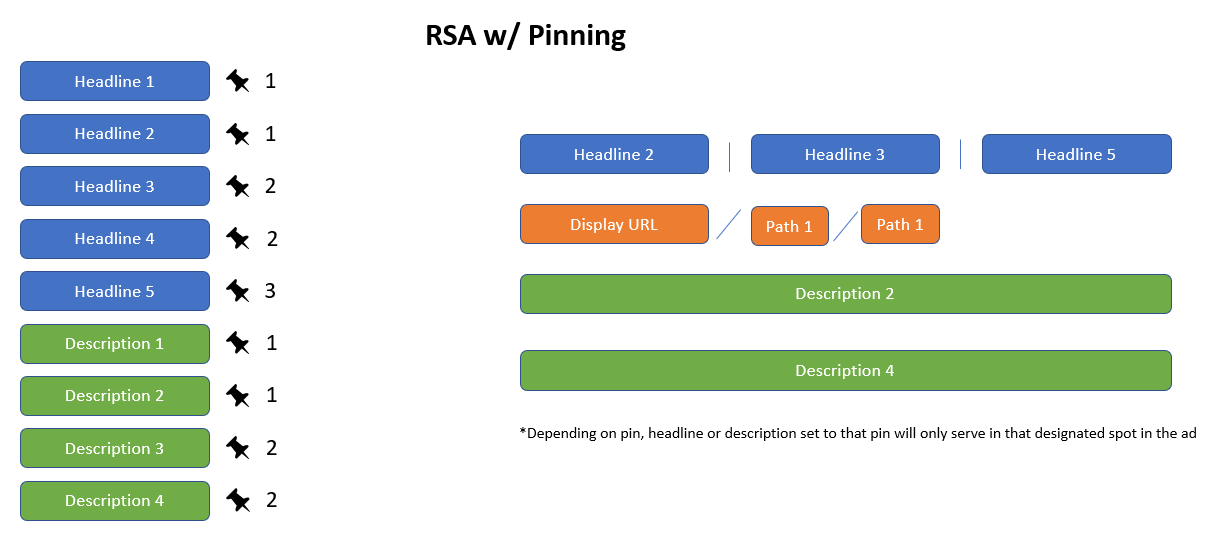
RSA’s with Pinning - Pinning allows advertisers to control where certain headlines and descriptions will appear within an ad text. Headlines can be pinned as either 1, 2, or 3, and descriptions can be pinned as 1, or 2. When pinned, Google will ensure that text will only appear in that position when the ad is served. Advertisers can also pin multiple headlines and descriptions to the same pin, and Google will rotate those headlines or descriptions in that position.
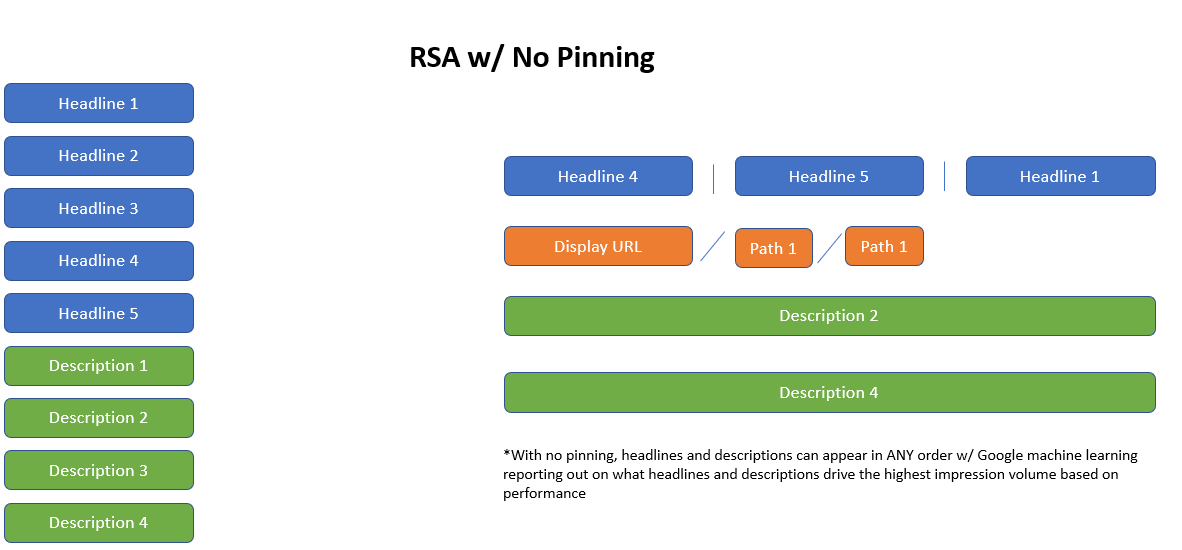
RSA’s without Pinning - Google will, based on machine learning, optimizes headlines and descriptions based on what consumers are responding to best. However, reporting is more limited in that Google will display the number of impressions for a headline or description, but not other metrics like conversions. This can be a great way to see how Google is optimizing ad copy vs. with pinning, but recommend only 1 version of ad copy be without pinning to maximize learnings through testing.
MA recommends 2 ads with pinning, and 1 without pinning to test combination of controlled ad copy and machine learning to maximize results and A/B testing.
Paths can’t be pinned, with the text entered for Path 1 and Path 2 will display in that order as written.
Ad Preview Tools (used to see unbiased search results):
Google - Ad Preview and Diagnosis Tool.
Bing - Ad Preview and Diagnosis Tool.
Using special characters with your ads
Most non-English characters, including tildes, umlauts, and cedillas, will appear correctly in your ads, including within the display URL.
Please review Google’s editorial policies
https://support.google.com/adwordspolicy/answer/6021546?hl=en
Google advertising policies help
https://support.google.com/adwordspolicy/topic/6021648?hl=en&ref_topic=1626336
Advertising Basics
Test implementing the following ideas when writing your ad to help improve your overall campaign’s performance:
Describe what sets your product apart. Why do customers buy your product? Does it solve a problem? Does it help save time or money? Or, does it have unique features or qualities? For example, if your product is available in many more colors than the competition can offer, you might mention color choices in your ad.
Use your customers' language. Research the age group and gender of your typical audience, and then use that insight to write your ads. Use words and a writing tone that are likely to attract your typical customer.
Address your customers directly. Use the words "you" or "your" in your ads so that you are speaking directly to them.
Pre-qualify your visitors. Use words in your ads that help attract true potential customers. For example, if you offer only high-end products, stay away from words like discount, bargain, and cheap. Be clear in your ad who your products are for. This can save you money by eliminating clicks that are not likely to convert to sales.
List the price of your product or service. If your product or service is competitively priced, consider featuring the price in your ad. To help ensure that your ad gets approved, make sure that the ad links to a landing page that includes both the product (or service) and the price.
Be specific. The clearer and more specific your offering, the better. For example, rather than "big discounts," specify an exact percentage, such as "50% off."
Include a call to action. Give customers a reason to click your ad right now. Offer a specific call to action, such as encouraging customers to request a brochure or consultation, download a free e-book, subscribe to a newsletter, or take advantage of a limited-time discount.
Attention-grabbing ad titles. Include keyword themes in ad copy to maximize quality scores.
For description text, recommend if using 3-4 versions, to have 2 descriptions with a CTA, and 2 without for testing.
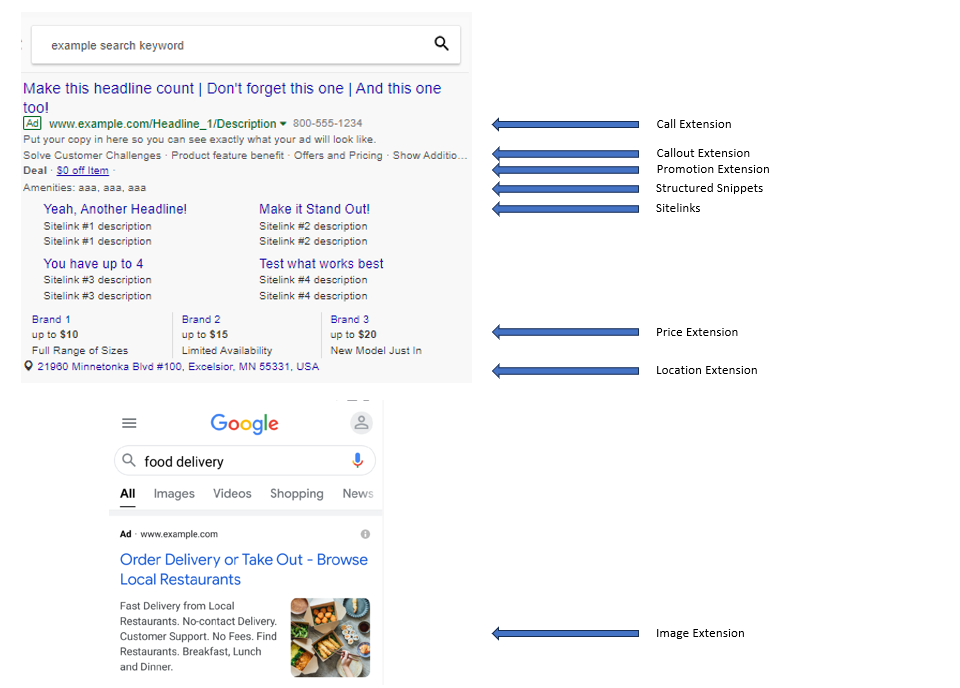
Use ad extensions to make your ad stand out from the competition by increasing ad visibility in the SERP, as well as ad extensions count against ad rank, influencing how much paid search costs, as well as where the ads appear on the page.
Strongly recommend using Sitelinks, Callouts, and Structured Snippets at a minimum, but can utilize as many extensions as is applicable. Additional details on character counts located in ad copy template link above:
Sitelinks - Clickable text and descriptions that direct users to other areas of the website
Callouts - Unique business attributes that separate you from your competitors
Structured Snippets - Highlight specifics of a product/service
Business Name - Your business name
Business Logo - Your business logo
Image Extensions - Additional imagery to incorporate visual aspect into search results
Call Extensions - Clickable link to call your business directly from within the ad
Location Extensions - Promote specific locations where your business is located, or where your products are purchased
Price Extensions - Highlights prices of specific products/services
App Extensions - Promotes link to your mobile app
Promotion Extensions - Way to highlight specific promotion, as well as can incorporate themes from certain holidays and occasions throughout the year
Lead Extension: Generates leads by letting people submit their information in a form directly in your ad.